
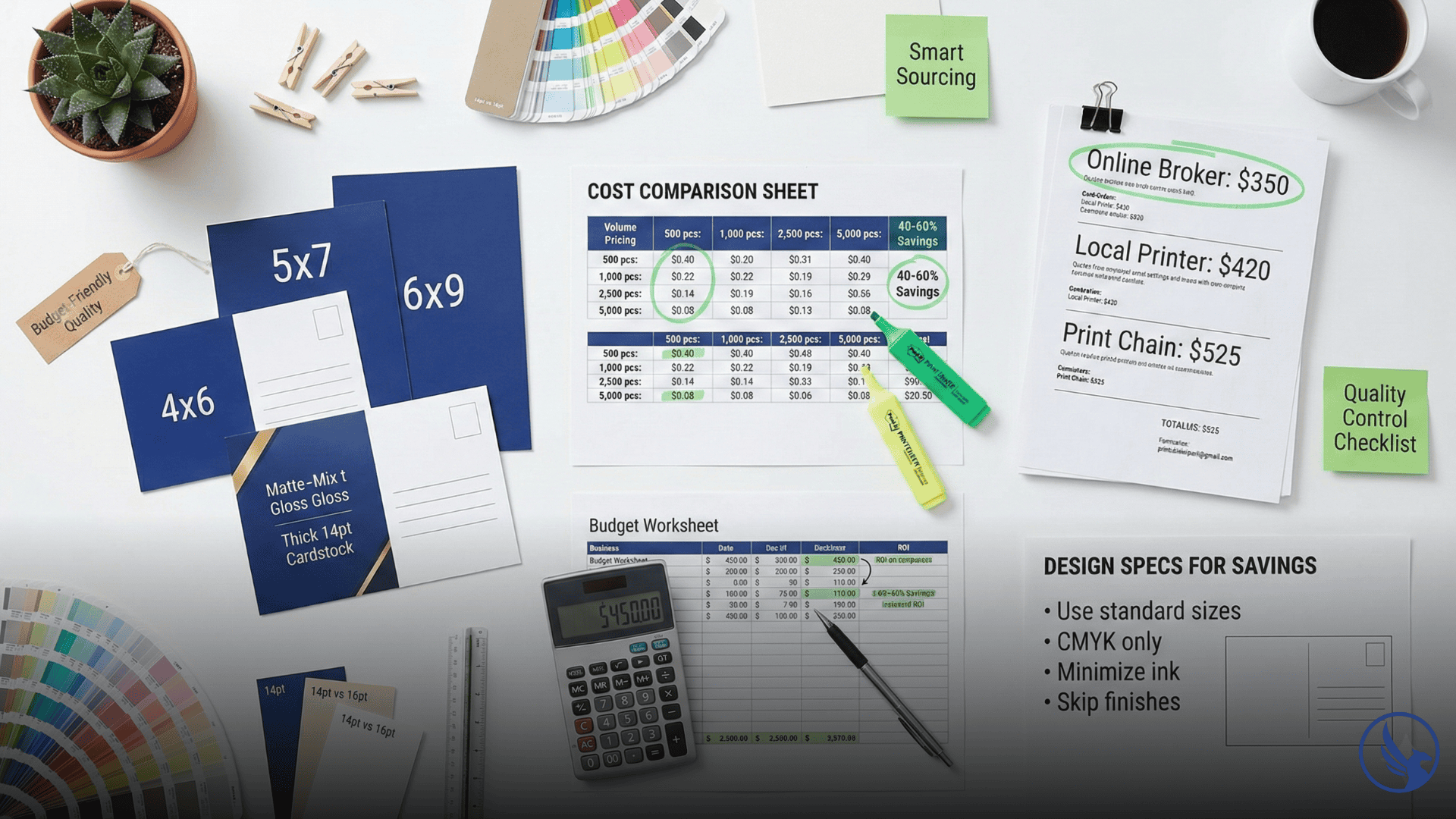
Startups face a brutal contradiction: direct mail works, but printing budgets don’t stretch far. The good news? Affordable postcard printing in 2026 doesn’t mean flimsy stock or washed-out colors. Consequently, smart sourcing, strategic design choices, and volume planning let bootstrapped businesses compete with established competitors. Here’s how to cut printing costs by 40-60% without your postcards looking cheap.
Understanding Where Printing Costs Come From
Most entrepreneurs assume paper quality drives pricing. However, it’s actually a smaller factor than you’d expect.
The real cost drivers:
Setup and plates: Printers charge for creating printing plates and calibrating equipment. This fixed cost gets distributed across quantity—1,000 postcards carry the full setup burden, while 10,000 postcards spread it thin.
Labor and machine time: High-speed presses cost $500+ per hour to operate. Therefore, short runs require the same operator time as large runs, making per-unit costs higher.
Proofing and revisions: Each design revision adds labor. Consequently, files with errors delay production and incur rush fees.
Special finishes: UV coating, foil stamping, and die-cutting require additional equipment passes that multiply costs.
The key to affordable printing: eliminate unnecessary complexity and maximize volume efficiency.
Volume Thresholds Where Prices Drop Dramatically
Postcard pricing isn’t linear. Instead, specific quantity breakpoints trigger sharp cost reductions.
Typical pricing structure (4×6 postcards, 14pt stock, full color):
- 500 pieces: $0.35–$0.45 each
- 1,000 pieces: $0.18–$0.25 each
- 2,500 pieces: $0.12–$0.16 each
- 5,000 pieces: $0.08–$0.12 each
- 10,000 pieces: $0.06–$0.08 each
Notice the drop from 1,000 to 2,500 pieces—you’re paying roughly half per card. For instance, if you can use 2,500 postcards over six months, ordering the full quantity upfront saves hundreds compared to multiple small runs.
The startup strategy: Pool multiple campaigns into single print runs. Specifically, design three different postcards for future use and print them all at once through bulk postcard printing. Storage costs far less than printing premiums.
Design Choices That Reduce Printing Costs
Smart design decisions cut expenses without visible quality loss.
Stick to Standard Sizes
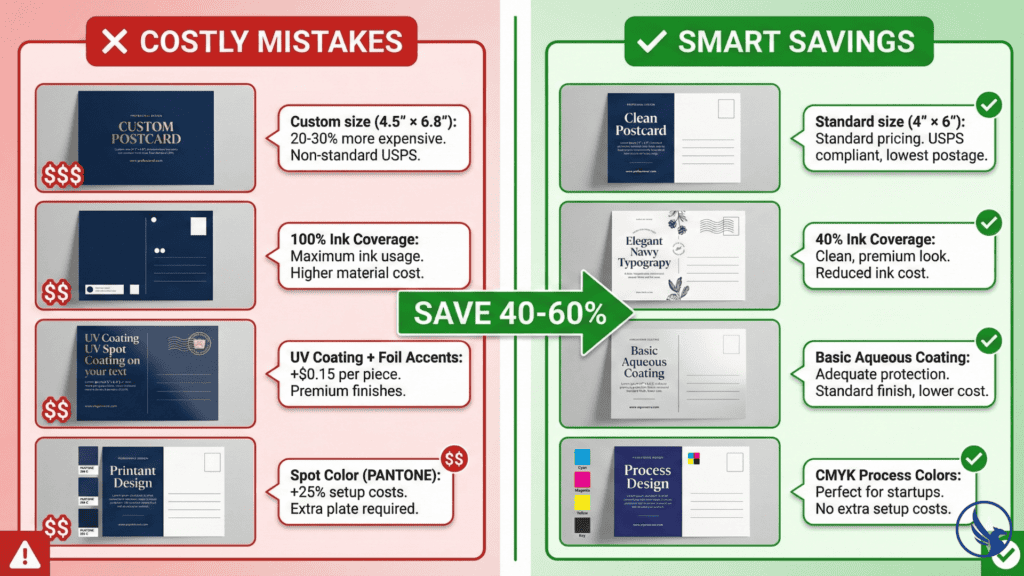
Custom dimensions require special cutting dies and generate paper waste. Therefore, USPS-standard sizes (4×6, 5×7, 6×9) cost 20-30% less than custom cuts.
Why this matters: A 4.5×6.5 custom postcard sounds unique but forces printers to use oversized sheets and discard excess. Consequently, that waste gets built into your quote.
Minimize Ink Coverage
Postcards with 30-40% ink coverage cost the same to print as those with 80% coverage—but the lower coverage design uses less ink, reducing costs on subsequent reprints.
Design tip: Use white space strategically. Clean layouts with breathing room look premium while consuming less ink. Furthermore, solid backgrounds across entire postcards waste resources without adding value.
Skip Unnecessary Finishes
UV coating adds $0.02–$0.04 per postcard. Meanwhile, spot gloss and foil can add $0.10–$0.20 per piece. For startup budgets, uncoated or basic aqueous coating delivers adequate protection at minimal cost.
When coating matters: If postcards will sit in outdoor displays or weather exposure, invest in coating. However, for direct mail that goes straight to mailboxes, skip it.
Use Process Colors Instead of Spot Colors
CMYK (process) printing mixes cyan, magenta, yellow, and black to create any color. In contrast, spot colors (PANTONE) require special ink mixing and equipment setup, adding 15-25% to printing costs.
The tradeoff: Spot colors offer slightly better brand color matching. However, for startups without strict brand guidelines, CMYK is indistinguishable to recipients and dramatically cheaper.
Where to Find the Cheapest Printing Without Quality Compromise
Not all printers serve the same market. Therefore, these options balance affordability with reliability.
Online Print Brokers
Services like PrintPlace, GotPrint, and PrintRunner aggregate production across multiple print facilities, leveraging volume for lower pricing.
Advantages: Competitive pricing, easy online ordering, predictable turnaround times.
Disadvantages: Limited customer service, no local pickup, shipping delays possible.
Typical pricing: 5,000 4×6 postcards for $300–$400 including basic shipping.
Best for: Startups comfortable with online ordering and standard turnaround (5-7 business days).
Local Commercial Printers
Regional printers compete on service and flexibility rather than rock-bottom pricing—but they negotiate.
How to get discounts: Request quotes from 3-4 local shops. Mention competing prices. Additionally, ask about volume discounts for committing to quarterly runs.
Hidden value: Local printers offer faster turnaround, in-person proofing, and will work with you on file corrections rather than rejecting orders outright.
Best for: Small businesses needing frequent small runs or hands-on support during design setup.
Print Chains (FedEx Office, UPS Store)
Convenient but rarely the cheapest option. Specifically, per-unit costs run 30-50% higher than online brokers.
When to use them: Emergency situations where you need 100 postcards printed in 24 hours. Otherwise, avoid for volume work.
See our full Postcard Printing and Mailing Services Guide for specs and templates.
Paper Stock Trade-Offs: What You Can Downgrade Safely
Thickness affects perception and durability. Here’s where you can cut costs:
14pt vs. 16pt stock: Most recipients can’t tell the difference between 14pt and 16pt thickness. Therefore, the thinner stock saves $0.01–$0.02 per postcard with no perceived quality loss.
Gloss vs. matte coating: Matte coating costs slightly less than high-gloss UV and looks sophisticated. Furthermore, recipients often perceive matte as more premium than glossy.
100lb cover vs. 14pt cardstock: These represent similar thickness ranges, though exact equivalence varies by paper type and manufacturer. 100 lb cover stock typically measures 11-14pt depending on the specific paper. Always compare actual point measurements, not just paper descriptions.
What not to downgrade: Never drop below 12pt stock. Consequently, thinner postcards curl during mailing and signal low quality immediately.
Timing Strategies That Lower Costs
Printers adjust pricing based on capacity utilization. Therefore, timing your orders strategically saves money.
Off-season printing: November-January (post-holiday) and June-August see lower demand. Request quotes during these windows for 10-15% discounts.
Longer lead times: Rush fees add 25-50% to printing costs. Ordering with 10-14 day turnaround instead of 48-hour rush saves substantially.
Consolidate campaigns: Instead of printing 1,000 postcards monthly, design three months of campaigns and print 3,000 at once. Consequently, the volume discount outweighs storage needs.
File Preparation Tips That Prevent Cost Overruns
Printer rejection fees and correction charges add up fast. Therefore, avoid these common design mistakes:
RGB vs. CMYK: Design in CMYK color mode from the start. Converting RGB files to CMYK causes color shifts that require reprinting.
Image resolution: Use 300 DPI images at final size. Lower resolution looks acceptable on screen but prints blurry, forcing redesigns.
Font embedding: Always embed fonts in PDFs or convert text to outlines. Missing fonts cause layout disasters and reprint fees.
Bleed setup: Extend backgrounds 0.125 inches beyond trim lines per USPS requirements. Forgotten bleeds create white edges after cutting.
Proof carefully: Most printers charge $25-$50 for file corrections after initial submission. Consequently, catching errors before upload saves these fees.
Negotiation Tactics for Better Pricing
Printers expect negotiation, especially for repeat business. Therefore, use these strategies:
Request itemized quotes: Ask for breakdowns showing paper, labor, and finishing costs separately. This reveals where you can cut expenses.
Mention competitor pricing: “PrintPlace quoted $350 for 5,000 postcards—can you match that?” Printers will often match or beat to win business.
Commit to volume over time: “I need 5,000 postcards quarterly. What’s your pricing for a 12-month commitment?” Volume commitments unlock discounts.
Pay upfront: Some printers offer 5-10% discounts for prepayment or net-15 terms instead of net-30.
Bundle services: If you also need business cards or flyers, bundling multiple products in one order strengthens negotiation leverage.
Ready to get professional-quality postcards at budget-friendly prices? Request a detailed quote with volume pricing options. Our team specializes in cost-effective postcard printing that maintains quality while maximizing your marketing budget. Whether you need 500 or 50,000 postcards, we’ll help you find the sweet spot between affordability and professional results.
Call 845-255-5722 to discuss volume discounts, file preparation assistance, or budget-optimized printing strategies.
Quality Control Checklist for Budget Printing
Cheap printing doesn’t mean skipping quality verification. Therefore, request these from any printer:
Physical samples of their work: Evaluate actual printed pieces, not just digital mockups. Paper quality varies between printers.
Color proofs: Digital proofs show layout but not true color. Physical color proofs (often $15-$30 extra) prevent expensive surprises.
Customer references: Ask for contact information from other startups they’ve printed for. Specifically, five minutes of reference checking prevents costly mistakes.
Satisfaction guarantees: Reputable budget printers offer reprints if quality doesn’t meet specifications. Avoid vendors who won’t stand behind their work.
Real-World Example: $200 Postcard Campaign That Generated $8,000
A personal training startup with a $200 marketing budget used these startup strategies:
Campaign setup:
- Designed three different 4×6 postcards (intro offer, referral incentive, class schedule)
- Printed 2,500 total cards (833 of each design) through GotPrint for $180
- Used EDDM® to mail 1,000 cards to nearby apartment complexes ($247 postage at $0.247 per piece per USPS rates)
- Kept remaining 1,500 cards as handouts at local events
- Total investment: $427 (printing + postage)
Results: 23 people redeemed the intro offer ($47 each for 4-week package). Revenue: $1,081 immediately plus $7,200 in renewals over 6 months.
Key insight: Volume printing upfront provided campaign flexibility without additional orders. Moreover, the trainer used different postcards for different audiences throughout the quarter, demonstrating strong direct mail ROI.
Start Your Affordable Postcard Printing Campaign
Affordable postcard printing requires planning over impulse. Specifically, design with constraints in mind, order in smart volumes, and choose printers based on total value rather than the lowest per-unit cost.
The startups that scale direct mail successfully start with budget-conscious campaigns that prove ROI, then reinvest profits into expanded mailings.
See our full Postcard Printing and Mailing Services Guide for specs and templates.